
Introduction
Most businesses do not realize this.
They are already running a mobile app.
It just lives in WhatsApp chats. Spreadsheets. Sticky notes. Email threads. And in someone’s memory.
Every day, your team follows the same steps.
Customer inquiry comes in.
Details get recorded.
Approval is requested.
Task is assigned.
Payment is confirmed.
That right there is a workflow.
Now imagine if those steps lived inside a simple mobile app instead of being scattered across tools. Fewer mistakes. Faster action. Clear tracking. Real visibility.
That is what turning business workflows into mobile app features really means.
It is not about building something complex. It is about organizing what you already do and making it smoother. Smarter. Easier to manage.
Many growing companies are already doing this.
Some use mobile apps to automate daily operations. Others use them to manage multi-location operations without chaos.
The difference is not technology. The difference is in structure.
At Boolean Inc. we often see businesses struggle with growth, not because they lack demand but because their internal processes are messy.
When workflows are unclear, everything slows down. When workflows become app features, everything speeds up.
In this practical guide, you will learn:
- How to identify workflows inside your business
- How to convert them into useful mobile app features
- What mistakes to avoid
- And how to build a system that actually supports business growth
If your team repeats the same tasks every day, this guide is for you.
Because chances are, your next big improvement is not hiring more people.
It is organizing what you already do into the right mobile app solution.
What Does “Turning a Workflow Into a Feature” Actually Mean?
Let’s clear something up first.
A workflow is not a document. It is not a flowchart stuck on the wall of a conference room. It is what actually happens inside your business every single day, whether you have written it down or not.
Think about it this way.
A customer places an order. Someone checks the stock. Another person packages it. A notification goes out. Payment is recorded. Delivery is confirmed. That entire chain of actions is a workflow. It happens with or without a system. The only difference is how smoothly it happens.
Now here is the important question.
How many of those steps happen manually right now?
If the answer is “most of them” you are leaving a lot of room for error. Delays. Miscommunication. And lost time that quietly adds up every single week. You may not notice it on day one, but you will feel it when your business starts to grow.
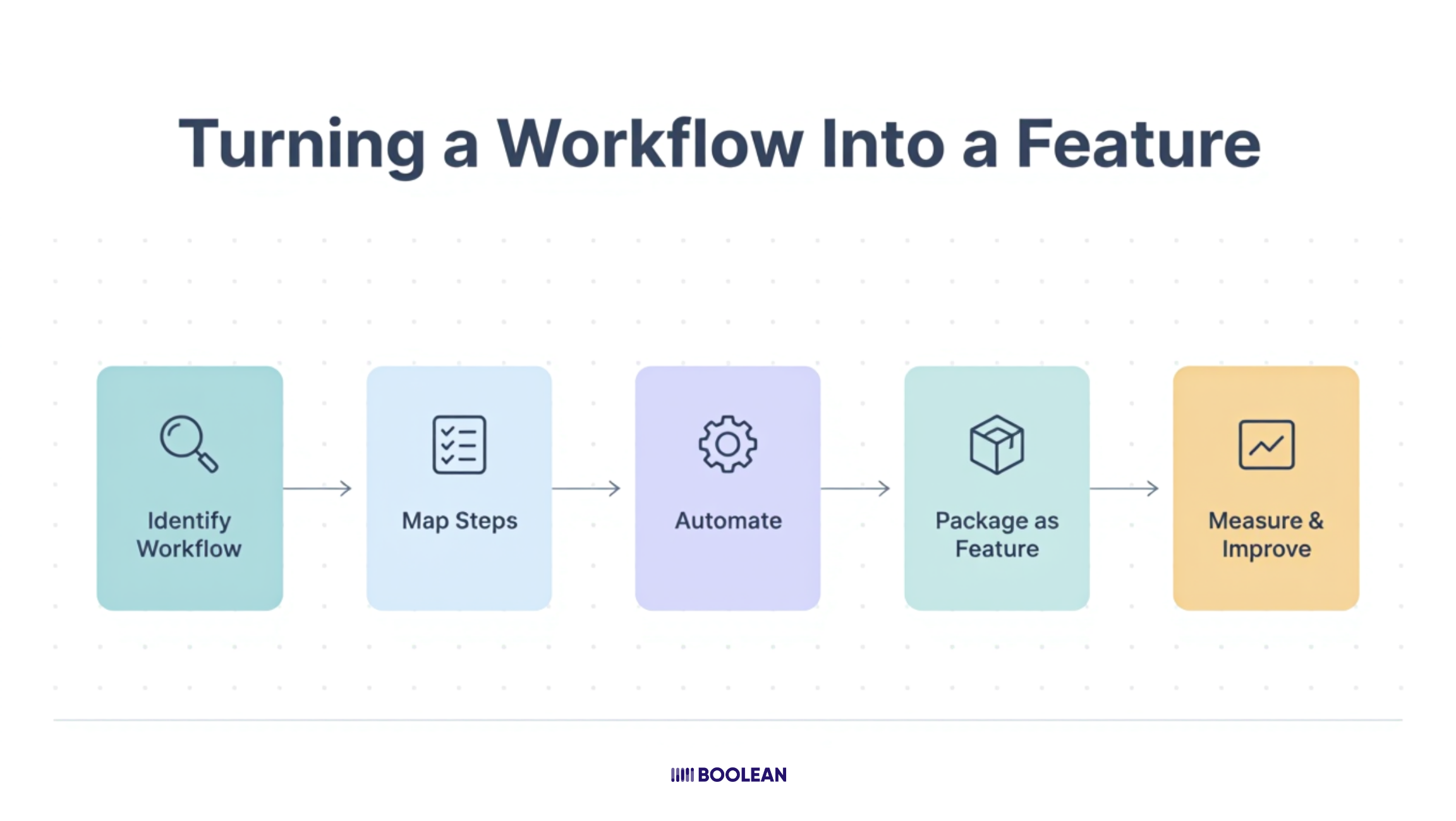
Turning a workflow into a feature simply means giving each step a proper home inside an app.
Instead of sending a WhatsApp message to check stock, you see a live inventory update on a screen.
You get a one-tap notification of a phone call for approval.
No more chasing someone for a payment confirmation; you get an instant status update.
These are shifts, but they make a big difference.
That is it. Nothing complicated. Just structure replacing chaos.
Here is a simple way to think about it:
| Workflow Step | Manual Way | App Feature |
| Customer inquiry | WhatsApp or phone call | In-app inquiry form |
| Task assignment | Verbal or email | Auto task assignment |
| Status update | Asking someone | Real-time dashboard |
| Payment confirmation | Manual check | Instant payment alert |
| Report generation | Excel sheet | Auto-generated report |
| Staff attendance | Register or calls | Digital check-in system |
| Customer follow-up | Memory or sticky notes | Automated reminder system |
See how each manual action becomes a clean app feature?
This is not about replacing your team. It is about removing the friction that slows your team down every single day.
Three things happen when you do this right:
- Your team stops wasting time on back-and-forth communication
- Your customers get faster and more consistent service
- You, as a business owner, get actual visibility into what is happening at all times
The Problem With Skipping This Step
A lot of businesses jump straight into app development without thinking about their workflows first. They come in with a list of features they think they need. An app that looks good. Push notifications. A dashboard. Maybe a loyalty program.
But here is the thing.
Features without workflows are just buttons. Buttons nobody ends up using.
You end up with an app that costs real money to build but sits unused because it was never connected to how your business actually operates.
That is a painful and expensive lesson and unfortunately, it is more common than you think.
The smartest approach is always to start with what your business already does and then build around that reality. Not around assumptions.
A Real Example to Make This Click
Imagine a home services company. Plumbing. Cleaning. Repairs. Something like that.
Right now, their process looks like this. Customer calls. The owner writes down the job. Assign it to a worker over WhatsApp. The worker shows up hopefully. Job gets done. The invoice is sent manually. Payment is chased over the phone.
Every single one of those steps is a future app feature.
- Customer calls → In-app booking form
- Owner writes down the job → Auto job creation
- WhatsApp assignment → Push notification to the right worker
- Worker shows up → GPS check-in confirmation
- Invoice sent manually → Auto-generated invoice
- Payment chased → In-app payment with instant confirmation
Same business. Same team. Completely different experience for everyone involved.
That is the power of mapping workflows before touching a single line of app development.
What Boolean Inc Looks For First
At Boolean Inc we always ask clients one simple question before anything else.
“Walk us through what happens when a new customer contacts you.”
The answer to that question usually reveals four or five app features right away. No guesswork. No assumptions. Just an honest conversation about how the business actually runs day to day.
When workflows are mapped clearly, the right features become obvious. And when the right features are built, the app actually gets used. Every day. By everyone on the team.
That is the goal.
Not a fancy app. A useful one. One that feels like it was made for your business because it actually was.
Identifying Which Business Workflows Are Ready to Go Mobile
Here is where most businesses get stuck.
Not because they lack workflows. Every business has them. They get stuck because they do not know which ones to start with.
They either try to move everything into an app at once or they pick the wrong workflows and wonder why the app never gets fully adopted by the team.
So, let us make this simple.
Not every workflow needs to go mobile right away. Some are too complex for phase one. Some are too small to matter. And some are absolutely perfect starting points that will give you quick wins and build momentum for everything that comes after.
The goal is to find those perfect starting points first.
Ask Yourself These Four Questions
Before deciding which workflow belongs in your app, ask these four questions about it.
1. Does this workflow happen repeatedly?
If something only happens once a month, it is probably not your priority. Look for workflows that happen daily or weekly. The more frequent the workflow, the bigger the impact when it moves into an app.
2. Does this workflow involve more than one person?
Single-person tasks are easy to manage manually. But the moment two or three people need to coordinate on something, things start to break down. Handoffs get missed. Updates get lost. Those multi-person workflows are golden opportunities for app features.
3. Does this workflow currently cause delays or complaints?
Your team will tell you where the pain is if you listen. Where do things slow down? Where do mistakes happen most often? Where do customers follow up, asking for updates? Pain points are workflow opportunities in disguise.
4. Does this workflow rely on someone’s memory or a personal device?
If the answer is yes, that workflow is at risk every single day. What happens when that person is sick? On leave? Or simply forgets? Workflows that live in someone’s head or personal WhatsApp need to move into a proper system fast.
If a workflow checks even two of these four boxes, it is ready to go mobile.
The Three Types of Workflows to Look For
To make things even clearer, here are the three categories of workflows that translate best into mobile app features.
1. Communication Workflows
These are workflows built around exchanging information. Approvals. Updates. Notifications. Confirmations. Right now, these probably happen over calls, texts or emails. Moving them into an app creates a single, clear channel where nothing gets lost and everything is on record.
2. Task and Operations Workflows
These involve getting work done. Assigning jobs. Tracking progress. Completing checklists. Logging results. If your team does any kind of fieldwork, service delivery or daily operations, this category is a goldmine for useful app features.
You can read more about this in our blog on How Businesses Can Use Mobile Apps to Automate Daily Operations, where we break down exactly how automation fits into day to day operations.
3. Customer-Facing Workflows
These are the steps your customer experiences directly. Booking. Ordering. Tracking. Receiving updates. Giving feedback. These workflows directly affect how your customer feels about your business.
A smooth customer-facing workflow can shorten the time it takes for someone to go from interested to paying.
In fact, we have covered this in detail in our blog on How Mobile Apps Shorten the Customer Buying Cycle and the difference a well-built flow makes is significant.
A Simple Workflow Audit You Can Do Right Now
You do not need a consultant for this. Grab a piece of paper or open a notes app and do this.
- List every repeated task your team does in a week
- Put a star next to the ones that involve back and forth communication
- Circle the ones that have caused a problem or delay in the last month
- Underline the ones that depend on one specific person to get done
What you are left with after that exercise is your workflow priority list. These are the workflows your app should be built around first.
Here is a quick reference to help you categorize what you find:
| Workflow Type | Ready to Go Mobile? | Priority Level |
| Daily repeated tasks | Yes | High |
| Multi-person handoffs | Yes | High |
| Customer communication | Yes | High |
| Monthly reporting | Sometimes | Medium |
| One-time processes | Rarely | Low |
| Complex approval chains | Plan carefully | Medium |
| Field team coordination | Absolutely | High |
Do Not Try to Move Everything at Once
This is important, so read it slowly.
Businesses that try to digitize every workflow in one go almost always run into trouble. The app becomes too big. The team gets overwhelmed. Adoption suffers. And suddenly, a project that was supposed to help the business ends up creating more confusion than before.
Start small. Pick two or three high-priority workflows. Build features around those. Let your team get comfortable. Then expand.
Think of it like building a house. You do not start with the roof. You start with the foundation and build up from there.
The same logic applies to Building Scalable Mobile Apps for Rapidly Growing Businesses, where starting lean and scaling smart is always the winning approach.
What Good Workflow Identification Looks Like in Practice
Here is a real scenario to paint the picture clearly.
A retail business with three locations was struggling with stock management. Each location had its own way of tracking inventory. One used Excel. One used a notebook. One relied on the manager’s memory. Reordering was always late. Stock-outs happened regularly. Customers were frustrated.
When they mapped their workflows, they found one critical repeating process.
Stock check → Low stock alert → Reorder request → Approval → Supplier order → Delivery confirmation.
Six steps. Happening across three locations. Manually. Every single week.
That one workflow became the foundation of their app. And once it was running smoothly, they expanded to include sales tracking and staff scheduling.
You can see how this kind of multi-location challenge plays out in our blog on How Businesses Use Mobile Apps to Manage Multi-Location Operations, which covers exactly this kind of growth scenario.
The point is, they did not build everything at once. They found the workflow that was causing the most pain and fixed that first.
That is the right way to do it.
Matching Your Workflows to the Right App Features
You have identified your workflows. Good.
Now comes the part where things actually start to take shape. Matching each workflow to the right app feature is where your ideas stop being abstract and start becoming something real and usable.
Think of it like fitting puzzle pieces together. Each workflow has a natural app feature that fits it. Your job is not to invent something new. Your job is to find the right match.
The Simple Matching Logic
Every workflow has three parts.
- A trigger (what starts it)
- A process (what happens in the middle)
- An outcome (what the end result should be)
Once you break a workflow into these three parts, the right app feature becomes obvious almost every time.
Here is a practical matching guide to make this even clearer:
| Workflow | Trigger | Process | App Feature |
| New customer inquiry | Customer contacts you | Details collected and assigned | In-app lead form with auto assignment |
| Staff task management | Work day begins | Tasks distributed and tracked | Task dashboard with notifications |
| Invoice and payment | Job is completed | Invoice sent and payment collected | In-app invoicing and payment gateway |
| Inventory tracking | Stock is used or sold | Levels updated and alerts sent | Live inventory tracker with low stock alerts |
| Customer updates | Order status changes | Customer is informed | Automated push notifications |
| Attendance tracking | Shift starts | Staff checks in and out | GPS or digital check-in feature |
See the pattern?
You are not creating features out of thin air. You are simply giving your existing workflow a proper digital home.
Features That Work Across Almost Every Business
Some app features are so universally useful that they fit into almost any business workflow regardless of the industry.
- Push notifications for updates, approvals and reminders
- In-app forms to capture information cleanly without back and forth
- Role based access, so each team member only sees what is relevant to them
- Real time dashboards for business owners who want visibility without asking around
- Automated alerts that trigger when something needs attention
These are not fancy additions. They are the backbone of any workflow-driven app.
If you want a broader view of what features matter most right now, our blog on Top Mobile App Features Every Business Should Have in 2026 is worth a read before you finalize your feature list.
One Workflow at a Time
Here is something worth repeating.
Do not try to match every workflow to a feature all at once. Pick your top workflow. Map it properly. Build it well. Then move to the next one.
This approach keeps the app lean and focused. It also makes it easier for your team to adopt new features gradually rather than feeling hit by everything at once.
At Boolean Inc, this is exactly how we approach the early stages of every app project. Start with the workflow that causes the most friction. Solve that first. Then build forward with a clear long term app roadmap that grows with the business rather than one that tries to do everything on day one.
Because a focused app that solves real problems will always outperform a bloated one that solves none.
Common Mistakes Businesses Make When Building Workflow-Based Apps
Building a workflow-based app sounds straightforward. And honestly, it can be.
But there are a few mistakes that come up again and again. Not because businesses are careless. But because nobody warned them before they started.
Here are the most common ones worth knowing before you begin.
1. Building Features Nobody Asked For
This is the most common one.
A business owner gets excited during the planning phase and starts adding features based on what looks good rather than what the team actually needs. The app ends up packed with options that sound impressive but never get used.
Always go back to the workflow. If a feature does not connect to a real repeated process in your business, it probably does not belong in version one.
2. Not Involving the Team Early Enough
The people who will use the app daily are your best source of information. Yet most businesses make decisions about the app without asking them anything.
Your front line team knows exactly where things break down. Where delays happen. Where information gets lost. Bring them into the conversation early and your feature list will be far more accurate.
3. Ignoring the User Experience
An app can have all the right features and still fail if it is confusing to use. If your team needs a training session every time something changes, that is a problem.
Simple and clean always wins over complex and cluttered. The best workflow apps feel almost invisible. They just make the job easier without getting in the way.
4. Trying to Launch Everything at Once
We touched on this earlier, but it is worth repeating here.
Businesses that try to go live with every feature on day one almost always struggle with adoption. Too much change too fast overwhelms teams and creates resistance.
A phased rollout where you launch core features first and expand gradually is almost always the smarter path.
This thinking also connects directly to Building a Long-Term App Roadmap for Business Growth, where pacing your development makes a real difference in outcomes.
5. Skipping the Testing Phase
No workflow translates perfectly from paper to app on the first attempt. There will always be gaps. Steps that were missed. Situations that were not accounted for.
Testing with a small group before full launch saves you from bigger problems down the line. It is not a delay. It is protection.
Mistakes are part of the process. Knowing them in advance just means you spend less time fixing them later and more time actually growing.
How to Get Started Without Feeling Overwhelmed
Most people read a guide like this and think “okay this makes sense, but where do I actually begin?”
That is a fair question. And the honest answer is simpler than you might expect.
You do not need a big budget to start. You do not need a technical background. And you definitely do not need to have everything figured out before taking the first step.
You just need a clear starting point.
Step 1: Write Down What Your Team Does Every Day
Not what they are supposed to do. What they actually do.
Follow the real process. Talk to your team. Spend one day just observing how work moves through your business. You will spot at least three or four repeated workflows without even trying hard.
Step 2: Pick the One That Causes the Most Pain
Do not overthink this part.
Look at your list and ask one simple question. Which of these workflows costs us the most time or causes the most mistakes every single week? That one goes first. Everything else can wait.
Step 3: Map It Out Simply
No fancy tools needed. A piece of paper works fine.
Write down each step of that workflow from start to finish. Who does what? What information moves between people? Where things currently slow down or get dropped. This simple map becomes the foundation of your first set of app features.
Step 4: Find the Right Development Partner
This is where a lot of businesses make a quiet mistake.
They either go with the cheapest option available or they go with someone who builds beautiful apps but has never thought seriously about business workflows. Both paths usually end in frustration.
Look for a partner who asks questions about your business before talking about technology. Someone who wants to understand how you operate before suggesting what to build.
At Boolean Inc this is always our starting point because an app built without understanding the business behind it is just an expensive guessing game.
Step 5: Start Small and Expand With Confidence
Launch with your core workflow features. Let your team use them. Gather real feedback. Then build the next layer.
This approach keeps costs manageable. It keeps your team from feeling overwhelmed. And it gives you real data about what is working before you invest further.
Businesses that scale their apps this way tend to see much stronger results than those who try to launch everything at once.
Conclusion
Here is the truth.
Every business has workflows. Most businesses just have not done anything useful with them yet.
The gap between a business that feels chaotic and one that runs smoothly is not always about hiring more people or spending more money.
More often than not it is about structure. About taking the things your team already does every day and giving them a proper system to live in.
That is exactly what a workflow-driven mobile app does.
It does not replace how your business works. It just makes it work better. Faster. With fewer mistakes and more visibility for everyone involved.
You have seen in this guide how simple the starting point really is. Find the workflow causing the most pain. Map it out honestly. Match it to the right features. Build lean and expand smart.
The longer you wait, the more time and money quietly slips away through manual processes that a well-built app could have handled in seconds.
Ready to turn your workflows into real app features?
At Boolean Inc. we help businesses do exactly this. No jargon. No unnecessary complexity. Just honest conversations about how your business works and what needs to be built around it.
Let’s talk and we will help you figure out the right starting point.
FAQs
1. What is a business workflow in simple terms?
A business workflow is the step by step process your team follows to complete a task. For example, handling a new customer inquiry from first contact to final payment. If it happens repeatedly, it is a workflow.
2. How do I know if my workflow should become a mobile app feature?
If the workflow often involves multiple people, causes delays or depends on manual tracking, it is a strong candidate. The more repetition and confusion involved, the bigger the benefit of moving it into an app.
3. Do I need to move all my processes into an app at once?
No. In fact that is not recommended. Start with one or two high impact workflows. Launch those first. Then expand once your team is comfortable and seeing results.
4. Will a workflow-based mobile app replace my team?
No. The goal is not to replace people. The goal is to remove repetitive manual work and reduce errors, so your team can focus on higher value tasks.
5. How long does it take to turn a workflow into an app feature?
It depends on the complexity of the workflow. Simple features like task tracking or notifications can be built quickly. More advanced features such as automation or AI-based tools may take longer. A clear plan always speeds things up.