
Native or Cross-Platform?
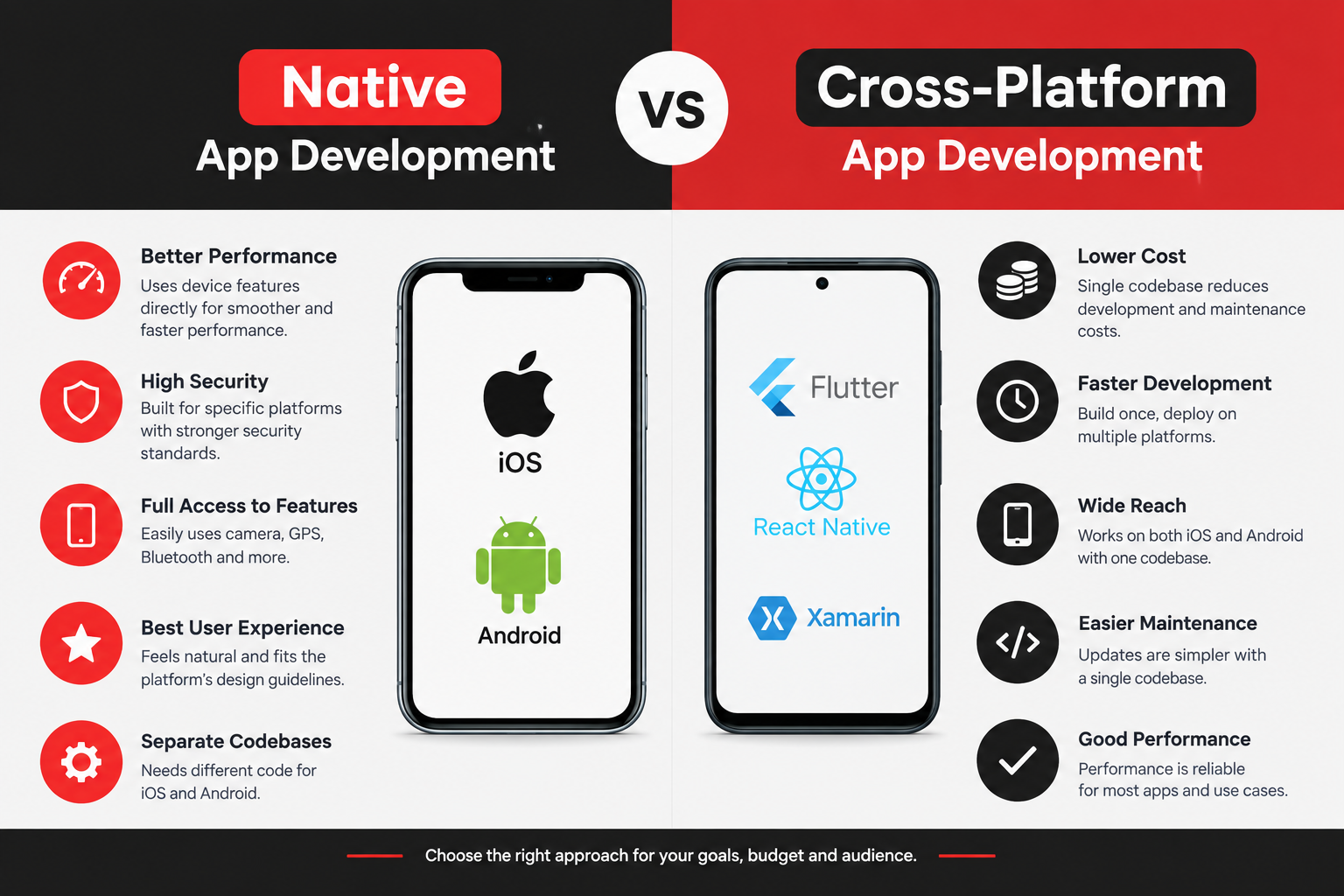
Cross-platform (Flutter or React Native) is the right default for roughly 80% of business apps in 2026. It ships to iOS and Android from one codebase for 30–40% less than two native builds, with performance users can’t distinguish from native. Native (Swift for iOS, Kotlin for Android) wins the other 20%: apps built around hardware, platform extensions like CarPlay or WatchOS, graphics-intensive experiences, or products that will only ever live on one platform.
The trade-offs that actually matter aren’t the ones in most comparison articles. Performance is nearly a tie now.
The real differences are in hardware access, platform-extension support, how your team is staffed, and what happens when Apple or Google ships something new.
| Factor | Native | Cross-platform | Who it matters to |
| Cost for iOS + Android | 1.8–2.0× | 1.0× (baseline) | Everyone |
| Time to market, both platforms | Slower | 30–40% faster | Startups, MVPs |
| Standard app performance | Best | Indistinguishable | Almost nobody, in practice |
| Graphics / sustained 60–120fps workloads | Best | Good (Flutter) to adequate (RN) | Games, AR, video editing |
| Deep hardware (BLE, camera pipelines, sensors) | Direct | Via plugins or custom native modules | IoT, health devices, and pro camera apps |
| Platform extensions (watchOS, CarPlay, widgets, App Clips) | First-class | Partial, often needs native code | Automotive, wearables, utilities |
| Day-one access to new OS features | Immediate | Weeks to months behind | Apps that market on “newest iOS feature” |
| Maintenance burden | Two codebases | One codebase | Small teams, bootstrapped founders |
| Platform-native look and feel | Automatic | RN: automatic. Flutter: emulated | Apps where “feels like iPhone” sells |
Key Takeaways
- Cost is the headline difference, and it’s real. Two native codebases cost 1.8–2.0× one cross-platform codebase to build and roughly the same multiple to maintain forever.
- Performance is no longer a reason to go native for standard apps. Flutter’s Impeller engine and React Native’s New Architecture closed that gap. It still matters for games, AR, and heavy media processing.
- Hardware and platform extensions are the real native advantage. Bluetooth peripherals, CarPlay, watchOS complications, Live Activities, and App Clips either need native code or work better in it.
- Cross-platform doesn’t mean zero native code. Most serious cross-platform apps contain 5–15% native Swift/Kotlin for the hard parts. Budget for a developer who can write it.
- The hidden cost of native is organizational, not technical. Two teams, two release trains, two sets of bugs, and feature parity meetings every sprint.
- The hidden cost of cross-platform is the escape hatch. When a plugin doesn’t exist or breaks on an OS update, someone has to drop to native. Teams without that skill get stuck.
- Kotlin Multiplatform is the emerging middle path: shared business logic, native UI on each platform. Worth watching, not yet the default for new startups.
- Decide based on your app’s hardest 10% of features, not its easiest 90%. The easy 90% works everywhere.
What Native and Cross-Platform Actually Mean in 2026
Native
Two separate apps, written in each platform’s first-party language and toolkit:
- iOS: Swift with SwiftUI (or UIKit for older codebases), built in Xcode
- Android: Kotlin with Jetpack Compose (or XML views), built in Android Studio
Each app talks directly to its operating system. No translation layer. Every API Apple or Google ships is available the day it ships.
Cross-Platform
One codebase that compiles to both platforms. In 2026, two frameworks are production-grade:
- Flutter (Google, Dart): draws its own UI with the Impeller engine
- React Native (Meta, TypeScript): renders real native components through the New Architecture
Both reach 80–100% code sharing between iOS and Android. Both let you write native Swift or Kotlin when you hit something the framework doesn’t cover. We compared them head-to-head in React Native vs Flutter in 2026; this article is about the layer above that decision.
What’s Not in This Comparison
Hybrid web wrappers (Ionic, Cordova, Capacitor) render a web page inside an app shell. They’re fine for content apps and internal tools, but they’re a step below Flutter and React Native in performance and polish, and they’re not what most people mean by “cross-platform” anymore. We covered the wider field in our mobile app development frameworks roundup.
Trade-Off #1: Cost, and Why It’s Bigger Than the Build
The Build Cost
| Scope | Native (iOS + Android) | Cross-platform | Difference |
| Simple app (8–12 screens) | $55,000 – $100,000 | $30,000 – $55,000 | ~45% less |
| Medium app (payments, 2 roles, integrations) | $140,000 – $280,000 | $75,000 – $150,000 | ~45% less |
| Complex app (real-time, compliance, custom logic) | $300,000 – $600,000 | $170,000 – $320,000 | ~45% less |
Native doesn’t cost exactly double, because the backend, design, discovery, and project management are shared. The frontend roughly doubles; everything else is shared. That nets out to cross-platform being 30–45% cheaper for the whole project. Full numbers are in our mobile app development cost breakdown.
The Cost Nobody Models: Maintenance
Here’s the part comparison articles skip.
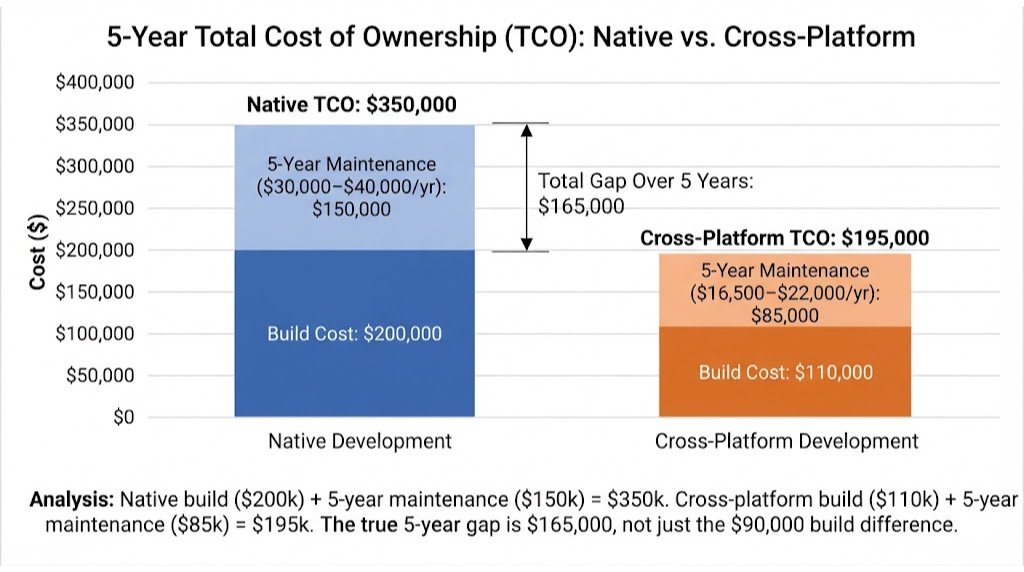
Maintenance runs 15–20% of build cost per year. If your native build was $200,000, that’s $30,000–$40,000 annually. The cross-platform equivalent at $110,000 is $16,500–$22,000.
Over five years, the gap isn’t $90,000. It’s $90,000 + ($15,000 × 5) = $165,000.
The Cost Nobody Mentions: Feature Parity
With two native codebases, every new feature is built twice, tested twice, and released twice. In practice, the two apps drift. iOS gets the feature first because the iOS developer finished first. Android users notice. Product meetings fill with “is that on both platforms yet?”
Cross-platform eliminates that whole category of overhead. One feature, one build, one release.
When Native Is Cheaper
Rarely, but it happens:
- You only need one platform. A single native iOS app costs about the same as a cross-platform app and performs marginally better. If you’ll genuinely never ship Android, native iOS is a fine choice.
- Your app fights the framework. If 40% of your features need custom native modules anyway, you’re paying cross-platform overhead plus native development. At that point, two clean native codebases can be cheaper than one messy cross-platform one.
Trade-Off #2: Performance, Honestly
For Standard Apps: It’s a Tie
Booking apps, marketplaces, fintech dashboards, social feeds, fitness trackers, B2B tools, e-commerce. In 2026, a well-built Flutter or React Native version of any of these performs identically to native in every way a user can perceive.
This wasn’t true in 2021. It is now. React Native’s New Architecture removed the asynchronous bridge that caused dropped frames. Flutter’s Impeller engine precompiles shaders and renders at a steady 60fps, or 120fps on ProMotion displays.
If someone tells you that you need native “for performance” on a booking app, they’re either out of date or selling you a bigger project.
Where Native Still Wins
| Workload | Why native wins | How much it matters |
| 3D games, real-time rendering | Direct Metal / Vulkan access; no framework overhead | Decisive. Use native or a game engine. |
| AR (ARKit / ARCore) | Plugins exist but lag platform releases and expose a subset of features | Significant for AR-first apps |
| Real-time video/audio processing | Camera and audio pipelines are platform-specific and performance-sensitive | Significant for pro media apps |
| Heavy on-device ML | Core ML and ML Kit integrate more cleanly in native | Moderate; plugins are improving |
| Sustained background work | Background execution rules differ per OS and are easier to tune natively | Moderate for fitness/location apps |
| App launch time | Native launches ~100–300ms faster | Marginal for most apps |
| Binary size | Native apps are 3–8 MB smaller | Marginal unless targeting emerging markets |
The Honest Summary
Performance is a reason to go native for perhaps 5–10% of apps. It’s cited as the reason in about 50% of native proposals. Question it.
Trade-Off #3: Hardware and Platform Extensions
This is where the native case is strongest and where founders most often get surprised mid-project.
Hardware Access
Every phone capability is reachable from cross-platform through plugins: camera, GPS, accelerometer, biometrics, NFC, Bluetooth. For standard use of each, the plugins are mature and reliable.
The trouble starts with non-standard use:
- Bluetooth Low Energy with custom peripherals (medical devices, IoT hardware, fitness equipment). The plugins handle common cases; the edge cases around connection state, background reconnection, and manufacturer-specific quirks often need native code.
- Custom camera pipelines (real-time filters, barcode scanning at high frame rates, document capture with edge detection). You’ll end up in native for the pipeline and cross-platform for the UI around it.
- Precise sensor fusion (step counting that competes with Apple Health and indoor positioning). Native APIs give finer control.
Platform Extensions
These are the features that live outside the main app, and they’re where cross-platform frameworks are weakest:
| Extension | Native | Flutter | React Native |
| Home screen widgets | Full | Needs native code (WidgetKit / Glance) | Needs native code |
| watchOS / Wear OS apps | Full | Not supported; separate native app | Not supported; separate native app |
| CarPlay / Android Auto | Full | Native code required | Native code required; community libs |
| Live Activities / Dynamic Island | Full | Native code required | Native code or plugin |
| App Clips / Instant Apps | Full | Native | Native |
| Siri Shortcuts / App Intents | Full | Native code | Native code |
| Share extensions, keyboard extensions | Full | Native | Native |
If your product roadmap includes two or more of these, the “cross-platform” app will carry a significant native component anyway. Sometimes that’s fine. Sometimes it tips the decision.
The rule we use at Boolean Inc.: if the platform extension is the product (a CarPlay-first parking app, a watch-first fitness tracker), go native. If it’s a nice-to-have on top of a phone-first product, go cross-platform and add the extension natively later.
Trade-Off #4: New OS Features and the Lag Problem
How the Lag Works
Apple announces iOS features in June. They ship in September. Native developers can use them in September.
Cross-platform frameworks need to wrap each new API. For high-profile features, Flutter and React Native typically have plugin support within 1–3 months. For niche APIs, it can be six months or never, until someone in the community writes the plugin, or your team does.
When This Matters
- You market on being first. “The first fitness app with new iOS feature” needs native.
- Apple makes a feature mandatory. Occasionally (privacy manifests, new sign-in requirements, SDK minimums), Apple sets a compliance deadline. Native teams adapt immediately; cross-platform teams wait for a framework update, then upgrade, then test.
- You build on a bleeding-edge capability. Vision Pro, new on-device AI frameworks, spatial computing. Native, full stop.
When It Doesn’t
For the overwhelming majority of apps, a new iOS feature arriving three months late is invisible to users. Your booking app doesn’t need day-one support for the newest camera API.
Trade-Off #5: Look, Feel, and Platform Conventions
The Argument for Native
iPhone users expect iPhone behavior: swipe-back navigation, specific scroll physics, sheet presentations, haptics. Android users expect Material Design: the back gesture, floating action buttons, specific ripple effects. Native gets all of this automatically.
How Cross-Platform Handles It
React Native renders real platform components, so you get native look and behavior by default. Your button is a UIButton on iOS and a Material button on Android. This is React Native’s genuine advantage in the native-feel debate.
Flutter draws everything itself. It ships Material and Cupertino widget sets that emulate each platform closely, but they’re emulations. Experienced iOS users can occasionally tell. For brand-first apps with custom design systems, this doesn’t matter at all: nobody expects Instagram to look like Settings. For utility apps where “feels like part of the OS” is a selling point, it’s a small point against Flutter.
The Design Reality
Most modern consumer apps have a custom design language anyway. Spotify, Uber, Airbnb, Duolingo: none of them look “native.” They look like themselves on both platforms. If that’s your direction, platform conventions matter less than brand consistency, and cross-platform’s identical rendering is an advantage, not a drawback.
Trade-Off #6: Team, Hiring, and the Two-Codebase Tax
Native Means Two Teams
Not two developers. Two teams, or at minimum two specialists who don’t share work. An iOS developer can’t pick up Android tickets when the Android developer is on vacation. Two release pipelines. Two sets of store review surprises. Two QA matrices.
For a funded company with a 10-person engineering org, that’s manageable. For a startup with one or two developers, it’s often the thing that stalls the Android app indefinitely.
Cross-Platform Means One Team, Plus a Safety Valve
One team ships both platforms. But somebody needs to be able to write native Swift and Kotlin when the escape hatch is needed (next section). That can be one developer who’s comfortable in both, or an agency with native specialists available.
Hiring Realities in 2026
| Role | Pool size | Typical US agency rate |
| Swift / iOS developer | Large | $120 – $200/hr |
| Kotlin / Android developer | Large | $120 – $200/hr |
| React Native developer | Very large (JS ecosystem) | $100 – $170/hr |
| Flutter developer | Medium, growing fast | $100 – $170/hr |
| Developer fluent in cross-platform + native | Small | $150 – $220/hr |
Rates by region are in our hourly rates guide. The pattern: cross-platform developers are slightly cheaper per hour, and you need half as many of them.
Trade-Off #7: The Escape Hatch Nobody Budgets For
This is the trade-off that bites cross-platform projects, and it rarely appears in the sales conversation.
What Happens
You’re 70% through a Flutter build. You need to integrate a payment terminal SDK that only ships native libraries. Or a plugin you depend on breaks with iOS 20 and the maintainer has gone quiet. Or the client wants a home-screen widget.
Each of these means writing native code and bridging it to the cross-platform layer. It’s a well-defined process in both frameworks. But it requires someone who can do it.
What It Costs
| Scenario | Typical native work | Added cost |
| Wrap a native-only SDK | 20–60 hours | $2,000 – $8,000 |
| Fix or fork an abandoned plugin | 10–40 hours | $1,000 – $5,000 |
| Add a widget or watch complication | 40–100 hours | $4,000 – $12,000 |
| Custom camera or BLE pipeline | 80–200 hours | $8,000 – $25,000 |
How to Plan for It
- Assume 5–15% of a serious cross-platform app will be native code. Budget for it.
- Make sure your team or agency has native capability on call. A pure-Flutter shop with no Swift experience is a risk. At Boolean Inc., our Flutter and React Native projects have iOS and Android engineers available for exactly these moments; it’s one of the reasons we keep both competencies in-house rather than specializing in one.
- List your native-dependency risks in discovery. Every SDK, every hardware integration, every platform extension. If the list is long, revisit the native decision before writing code.
The Third Option: Kotlin Multiplatform
What It Is
Kotlin Multiplatform (KMP) lets you share business logic (networking, data models, validation, caching) in Kotlin across iOS and Android, while building the UI natively on each: SwiftUI on iOS, Jetpack Compose on Android. Compose Multiplatform extends this to shared UI as well, with iOS support now stable.
Why It’s Interesting
You get native UI, native performance, and native platform access, with 40–70% code sharing on the logic layer. It’s the “both” answer.
Why It’s Not the Default Yet
- You still need iOS developers who are comfortable with a Kotlin shared module in their project.
- The tooling and ecosystem are younger than Flutter or React Native.
- For most startups, the UI is most of the mobile work, so sharing only logic saves less than it sounds.
Who Should Consider It
Companies that already have native iOS and Android teams and want to reduce duplication without a rewrite. Netflix, McDonald’s, and Forbes use KMP in production. For a new startup choosing from scratch, Flutter or React Native remains the more practical cross-platform choice in 2026.
Real Example: When We Told a Client to Go Native
We recommend cross-platform for most projects. Here’s one where we didn’t.
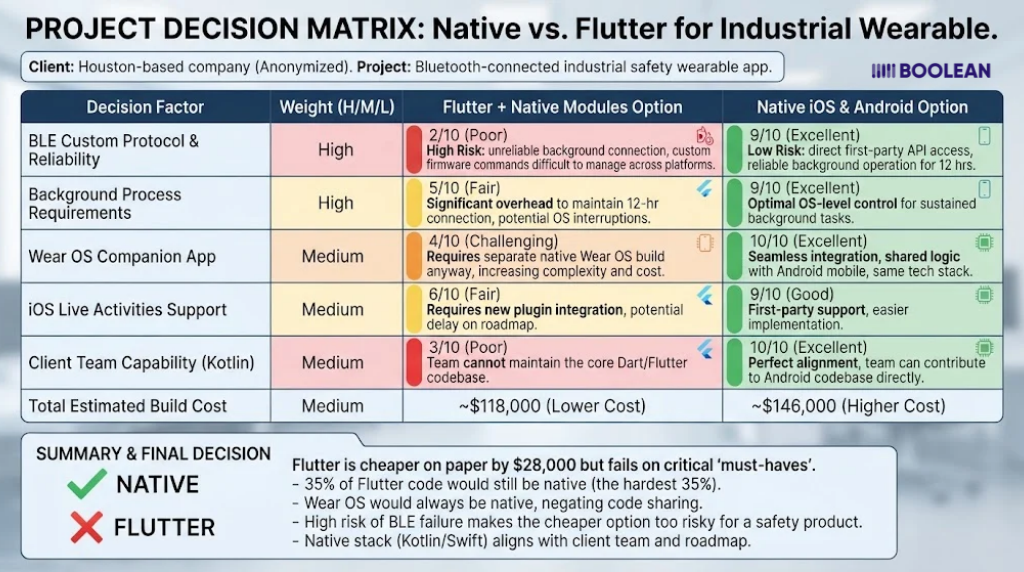
Client: A Houston-based company building a companion app for a Bluetooth-connected industrial safety wearable. Anonymized with permission.
Initial request: “Flutter, both platforms, as cheap as possible.”
What discovery surfaced:
- The wearable used a custom BLE protocol with proprietary firmware commands
- The app had to maintain a background connection for up to 12 hours per shift
- Supervisors needed a Wear OS companion for alerts
- iOS Live Activities were on the six-month roadmap for shift status
- The client’s own hardware team worked in Kotlin
The analysis:
| Approach | Estimated build | Native code share | Risk |
| Flutter + native modules | $118,000 | ~35% | High: BLE background behavior, Wear OS separate anyway |
| Native iOS + Android | $146,000 | 100% | Low: everything is first-party API |
The cross-platform version was cheaper on paper by $28,000. But 35% of it was native code regardless, the hardest 35%, and the Wear OS app had to be native no matter what. We’d be paying Flutter’s integration overhead to share the easy parts.
The recommendation: native. Kotlin first (matching their team and the Wear OS requirement), Swift second.
Outcome: Android shipped in 14 weeks, iOS in 10 more. Background BLE reliability, the one thing that could sink the product, was never an issue. The client’s hardware team now contributes to the Android codebase directly.
The lesson: the decision turned on the hardest 10% of the feature list, not the easiest 90%. That’s how it should be made.
The 10-Question Decision Test
Answer honestly. Count the “yes” answers in each column.
| # | Question | Yes → Native | Yes → Cross-platform |
| 1 | Will the app ship on only one platform for at least two years? | ✓ | |
| 2 | Is a custom Bluetooth, camera, or sensor pipeline central to the product? | ✓ | |
| 3 | Is a watch, car, or TV experience the primary use case (not an add-on)? | ✓ | |
| 4 | Does the app render 3D, AR, or real-time video as its core function? | ✓ | |
| 5 | Do you market on day-one support for new iOS/Android features? | ✓ | |
| 6 | Do you need both platforms at launch? | ✓ | |
| 7 | Is your total mobile budget under $150,000? | ✓ | |
| 8 | Will a team of 1–3 developers maintain this long-term? | ✓ | |
| 9 | Is your UI custom-branded rather than platform-conventional? | ✓ | |
| 10 | Will features change frequently based on user feedback after launch? | ✓ |
Three or more “yes” in the native column: go native, or at minimum plan for a large native component.
Fewer than three: cross-platform is almost certainly right. Choose between Flutter and React Native using our React Native vs Flutter guide.
Exactly two or three in native, and most of the cross-platform column too: this is the KMP zone, or a cross-platform app with a well-planned native layer. Talk to someone who’s done both before committing.
The Bottom Line
Native vs cross-platform app development isn’t a quality debate anymore. Both produce excellent apps.
It’s a fit debate:
- Cross-platform fits the business app, the marketplace, the MVP, the small team, the tight budget, and the fast iteration cycle. That’s most apps.
- Native fits the hardware product, the platform-extension product, the graphics-heavy product, and the single-platform product. That’s the rest.
Make the call on your hardest features, budget for the escape hatch either way, and don’t let anyone sell you native “for performance” on a booking app, or cross-platform “because it’s cheaper” on a Bluetooth medical device.
If you’re earlier in the process and still deciding which platforms to target at all, our platform selection guide covers the broader landscape, and we’ll tackle “iOS or Android first” in a dedicated post later in this series.
FAQs
What is the difference between native and cross-platform app development?
Native development builds separate apps for iOS (Swift) and Android (Kotlin) using each platform’s own tools, with direct access to every OS feature. Cross-platform development uses one codebase, typically Flutter or React Native, that compiles to both platforms with 80–100% code sharing, at 30–45% lower total cost.
Is native app development better than cross-platform?
Not universally. Native is better for hardware-intensive apps, platform extensions like watchOS or CarPlay, 3D/AR, and single-platform products. Cross-platform is better for most business apps, MVPs, and small teams because it ships both platforms faster and cheaper with performance users can’t distinguish from native in 2026.
How much cheaper is cross-platform than native?
Cross-platform typically costs 30–45% less for the full project, because the frontend is built once while backend, design, and management are shared either way. A medium-complexity app might cost $140,000–$280,000 native versus $75,000–$150,000 cross-platform, with maintenance savings of a similar proportion every year after.
Do cross-platform apps perform worse than native apps?
For standard apps, no. React Native’s New Architecture and Flutter’s Impeller engine deliver 60–120fps performance indistinguishable from native for booking, marketplace, fintech, social, and productivity apps. Native retains an advantage for 3D rendering, AR, real-time video processing, and heavy on-device ML.
Can cross-platform apps access hardware like Bluetooth and the camera?
Yes, through plugins, and for standard use the plugins are mature. For non-standard use such as custom BLE protocols, background connections, or custom camera pipelines, you’ll typically write native Swift or Kotlin modules and bridge them in. Budget for 5–15% native code in any serious cross-platform app.
What is Kotlin Multiplatform, and is it a good middle option?
Kotlin Multiplatform shares business logic in Kotlin across iOS and Android while keeping native UI on each platform. It’s a strong option for companies that already have native teams and want to reduce duplication, but for new startups in 2026, Flutter or React Native remains the more practical cross-platform choice.
Should a startup build native or cross-platform for an MVP?
Cross-platform, in almost every case. An MVP needs to reach users fast and cheaply, iterate often, and be maintainable by a small team. Flutter or React Native delivers that. The exceptions are MVPs whose core value depends on hardware integration or a platform extension.
Can I start cross-platform and move to native later?
Yes, and it’s common. Backend, APIs, and design carry over entirely; only the mobile frontend is rewritten. Many companies launch cross-platform, validate the market, then rebuild natively if and when a specific need (performance, hardware, platform extensions) justifies the cost.