
Introduction
Your smartphone is smarter than you think. It recognizes your face. It finishes your sentences. It even knows which photos you want to delete and which ones you will keep forever.
That is artificial intelligence at work. Quiet but powerful.
And the numbers tell a massive story. The AI in mobile apps market sits at USD 21.23 billion in 2024.
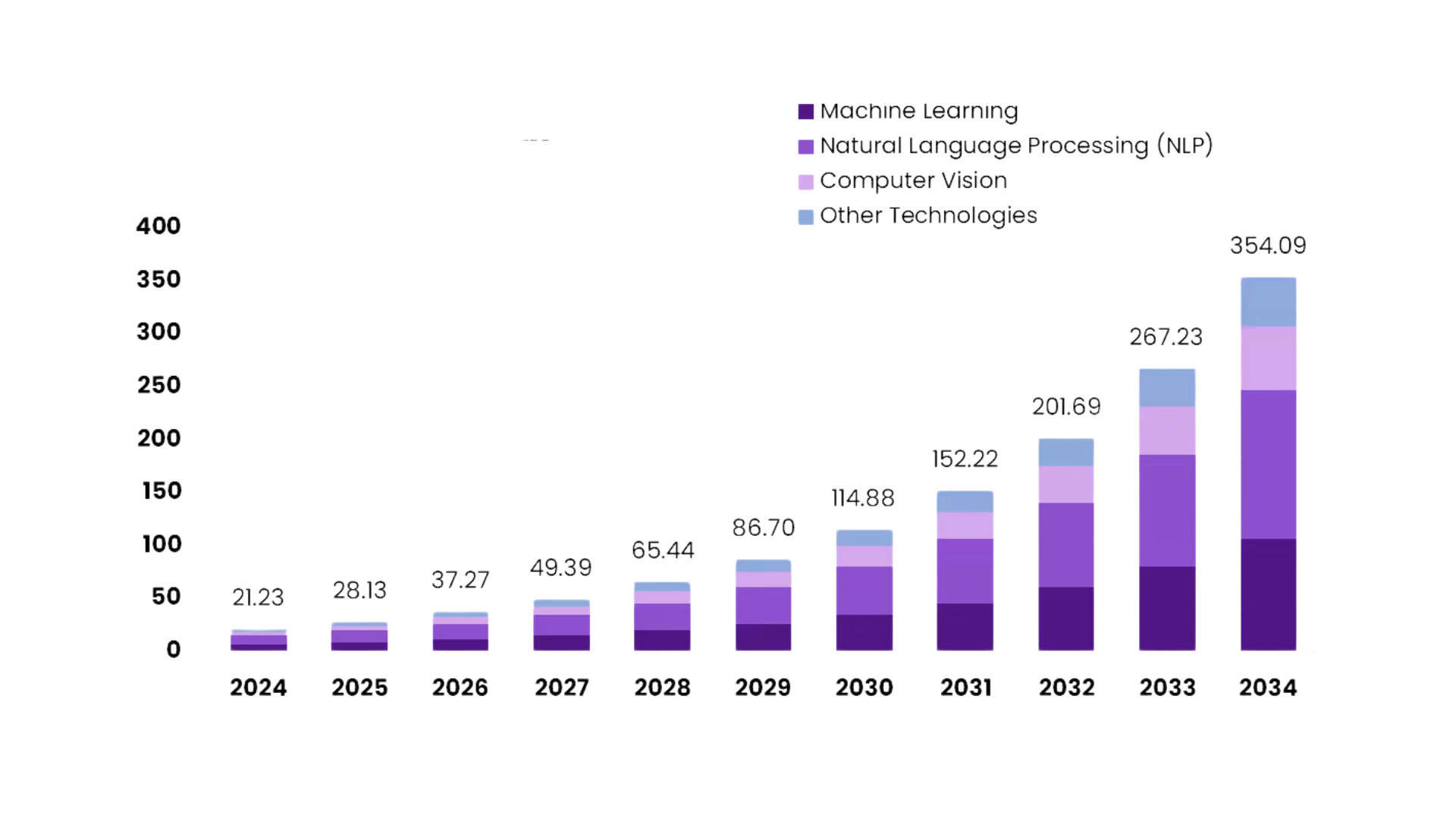
It is very much anticipated that by 2034 the volume will be worth 354.09 billion U.S. dollars. The increase that occurs every year from 2025 to 2034 is 32.5%.
Take time to think about that.
This is not a tiny wave. This is a huge wave of opportunity. And startups are the ones who are right there on the front line.
Here is what makes 2026 special. The tools are easier. The costs are lower. The barriers that once kept small teams out? They are crumbling fast.
A startup that is struggling and has a brilliant idea can now be on part with the giants. You just need to figure out how to start.
But starting can feel confusing.
What AI features actually matter?
Which platform should you build on?
Should you go with iOS or Android or both?
And how do you find a top mobile app development company USA that understands your vision without draining your budget?
These questions keep many founders stuck. Stuck in research mode. Stuck in overthinking. Stuck while competitors race ahead.
This guide exists to unstick you.
We will walk through everything together. Simple explanations. Practical steps. Real guidance you can actually use.
By the end you will know exactly how to move forward. Confidently. Clearly. Ready to build something that matters.
So let us begin.
What Is AI in Mobile Apps?
AI in mobile apps means teaching an app to understand patterns so it can respond in a way that feels natural.
The app watches how people use it then adjusts its behavior step by step. It learns from taps, searches, choices and even moments of hesitation. This learning lets the app offer quicker help and fewer extra steps.
Think of an app that remembers your favorite items. Or one that answers questions in plain speech.
Or one that scans a photo and gives instant results. These simple actions show how AI makes apps feel more personal and more aware of what the user needs.
Teams that build for Android often explore Android app development Austin because the local talent and support help them shape steady AI features.
The goal stays the same across all paths. Create an experience that learns. Create a flow that gets smoother over time. Create an app that feels smart without feeling complicated.
Why Startups Should Care About AI in 2026
The timing has never been better. That is not hype. That is reality.
AI is not some distant technology reserved for billion-dollar companies anymore. It has become accessible. Affordable. Essential.
And 2026 is the year when startups either jump on board or get left behind.
Let me show you why this matters for your business right now.
The Market is Screaming for AI Apps
Users have tasted what AI can do. They experienced personalized recommendations on Netflix. They talked to Siri and Alexa. They watched TikTok’s algorithm read their mind.
Now they expect that same intelligence everywhere.
An app without AI feels outdated. Clunky. Like using a flip phone in a smartphone world.
Your competitors know this. Some are already building. The ones who move fast will capture the market while others sit on the sidelines wondering what happened.
5 Powerful Reasons to Integrate AI Now
- Stand Out in a Crowded App Store
Millions of apps exist. Most of them blend together into digital wallpaper.
AI is a tool that provides you with an advantage which helps you to be noticed amidst the multitude of voices. A fitness app that designs personalized workout plans according to your body type and progress?
That gets attention. A shopping app that knows your style better than your best friend? That gets downloads.
People remember apps that feel smart. Be the one they remember.
- Keep Users Engaged Longer
The typical app is reported to have 77% of its user base disappear within the first three days. Very harsh but still real.
AI changes this equation. When your app learns user behavior it delivers exactly what people want before they even ask. That creates sticky engagement. Users stick around because the experience keeps getting better.
That is, if you get more users to interact with your app, then you will be able to keep a higher percentage of them. The higher retention rate will then lead to continuous growth of your business.
- Automate Tasks That Drain Resources
Startups run lean. You cannot afford massive support teams or endless manual processes.
AI handles repetitive work automatically. Chatbots answer customer questions 24/7. Image recognition sorts user uploads without human help. Recommendation engines match users with content while you sleep.
This frees your small team to focus on what actually grows the business. Strategy. Innovation. Building relationships that matter.
- Make Smarter Decisions with Data
Your app generates data every second. User taps. Search queries. Time spent on each screen.
Without AI this data sits there like gold buried underground. Valuable but useless.
AI turns raw data into insights. It spots patterns you would never catch manually. Which features frustrate users? What time of day do people engage most? Where do they drop off in your signup flow?
Answer these questions and you make better decisions faster.
- Scale Without Breaking Your Budget
Traditional scaling requires more people. More servers. More costs piling up as you grow.
AI scales differently. Once built it handles ten users or ten thousand users without additional strain. A recommendation engine works just as well for a small audience as it does for millions.
That means you grow efficiently. Revenue climbs while costs stay manageable.
Real Results from Real Startups
Let me paint a picture with actual examples.
- A language learning startup added AI voice recognition. User retention jumped 40% in three months.
- A food delivery app integrated smart recommendations. Average order value increased by 25%.
- A mental health app used AI to personalize therapy exercises. User satisfaction scores hit all-time highs.
They are not as heavily funded as one might imagine. These are resourceful teams that took the right steps very early on.
The Cost of Waiting
Here is what happens when you delay.
Competitors build momentum while you research. Users get comfortable with other apps. Investors fund teams who show innovation instead of hesitation.
The window is still there but it won’t stay there forever.
Risers first take hold of market share. They become the benchmark everyone else looks at. Would you rather be the one to set the standard or follow it years later?
Check out our detailed guide on App Development Cost for Startups in 2025 (USA Guide) to plan your budget and build smarter.
Nevertheless, What About the Problems?
Yes, there are difficulties in the incorporation of AI. Selecting the most suitable features. Partnering with the right people who have the required skills and keeping your expenses under control.
Those problems exist. However, they can be solved as well. Every startup faces obstacles. The winners find ways through instead of reasons to wait.
And here is the secret. You do not need to solve everything at once.
Start small. Pick one AI feature that makes sense for your users. Test it. Learn from it. Then build on that foundation.
Progress beats perfection every time.
The Bottom Line
AI in 2026 is not a luxury. It is a necessity for startups who want to compete and win.
The technology exists. The tools are ready. The market is hungry for smart apps that deliver personalized experiences.
Your job is simple. Decide to act. Choose wisely. Execute boldly.
Now that you understand why AI matters the natural next question emerges. What specific AI features can you actually add to your app?
Let us dive into that next.
Common AI Features You Can Add to an App in 2026
AI features in 2026 are easier to add than most beginners expect.
These features do not need deep technical backgrounds. They simply rely on clear goals and steady testing. When used well they help users feel understood which builds trust and long term engagement.
Most startups begin with simple AI tools. A few features listen. A few predict. A few guide choices.
Together they create an experience that feels smooth and personal. Many teams choose cross-platform options for these features since they can reach more users at once.
Some even partner with a Flutter mobile application development company when they want fast design cycles along with clean performance for AI driven screens.
Here are some common AI features used in mobile apps for 2026.
Popular AI Features in Mobile Apps (2026)
| AI Feature | What It Does | Good For Beginners? | Example Use Case |
| Smart search | Learns user terms and improves results | Yes | Better product or content discovery |
| Voice commands | Understands simple speech | Yes | Hands free actions inside the app |
| AI chat help | Answers questions instantly | Yes | Basic support for new users |
| Image recognition | Reads photos or objects | Medium | Scanning products or documents |
| Predictive suggestions | Shows what users may want next | Yes | Recommending items or actions |
| Behavior tracking | Studies user habits | Medium | Improving app flow or timing |
| Content personalization | Adjusts layout or content | Yes | Making each user’s view unique |
AI features do not need to be complex to create value. Even one small smart feature can change how users feel when they open an app.
The key is to start simple then grow as you learn more about what people enjoy.
How AI Improves the User Experience
User experience makes or breaks your app. Period.
You can have the billion dollar app idea in the world. You can solve a real problem. But if your app feels clunky or confusing or just plain annoying? People delete it without a second thought.
AI changes the game completely. It transforms a basic app into something that feels alive and responsive and deeply personal.
Let me show you exactly how that happens.
The Magic of Personalization
Think about walking into a coffee shop where the barista knows your name. Knows your usual order. Remembers you like extra foam but no sugar.
That feels good right?
AI does this for your app. Every single time someone opens it.
A shopping app remembers what colors you browsed last week. A news app learns which topics make you click. A workout app adjusts routines based on how sore you felt yesterday.
This is not creepy tracking. This is thoughtful attention. Users do not want generic experiences anymore. They want apps that get them.
AI delivers that understanding at scale.
Speed That Feels Like Mind Reading
Nobody likes waiting. Not for pages to load. Not for search results. Not for anything.
AI predicts what users want before they finish asking. Search bars auto-complete intelligently. Content loads based on predicted next actions. Navigation shortcuts appear exactly when needed.
The app feels fast because it is already three steps ahead.
Here is a real example. Music streaming apps do not just play songs. They pre-load tracks you will probably want next based on your listening patterns. Hit skip and the next song starts instantly. No buffering. No delay.
That seamless experience? Pure AI at work.
Conversations That Actually Help
Remember the old chatbots? The ones that made you want to throw your phone across the room?
“I’m sorry I didn’t understand that. Please rephrase your question.”
Useless. Frustrating. A waste of everyone’s time.
Modern AI chatbots are different. They understand context. They remember previous messages in the conversation. They detect emotion in your words and respond appropriately.
Check out our guide on the best AI chatbots in 2025 for mobile apps and web platforms to enhance your app’s user experience.
What This Looks Like in Practice
| Old Chatbot | AI-Powered Chatbot |
| Follows rigid scripts | Understands natural language |
| Repeats the same useless answers | Learns from each interaction |
| Forces you into specific keywords | Handles casual conversation |
| Cannot solve complex issues | Escalates smartly when needed |
| Feels robotic and cold | Feels helpful and human |
Users get answers fast. Problems get solved without waiting for human support. Satisfaction goes up while support costs go down.
Everyone wins.
Interfaces That Adapt to You
Most apps force everyone into the same experience. Same layout. Same features in the same places. Same journey from start to finish.
AI flips this approach completely.
It watches how you use the app. Then it reorganizes itself around your habits.
A productivity app might move your most-used features to the top. A recipe app might hide ingredients you are allergic to automatically. A banking app might surface bill payments on the days you usually pay them.
The interface becomes your interface. Tailored. Efficient. Comfortable.
Smarter Notifications That Don’t Annoy
Push notifications are powerful. They are also dangerous.
Send too many and users disable them or delete your app entirely. Send irrelevant ones and you train people to ignore everything you send.
AI solves this delicate balance.
It learns when each user is most likely to engage. It figures out which types of messages matter to different people. It spaces notifications to avoid overwhelming anyone.
The Result?
Higher open rates. Better engagement. Users who actually appreciate hearing from your app instead of dreading it.
A fitness app sends workout reminders when you are historically most motivated. A shopping app alerts you about sales on brands you actually buy. A meditation app nudges you during times you tend to feel stressed.
Relevant. Timely. Welcome.
Error Prevention Before Problems Happen
The best user experience is one where nothing goes wrong.
AI catches potential issues before users even notice them.
Uploading a blurry photo? The app suggests retaking it. Entering an invalid email format? Instant gentle correction. About to submit a form with missing fields? Helpful highlight before you hit send.
This proactive assistance reduces frustration dramatically. Users feel guided instead of criticized. Supported instead of scolded.
Accessibility for Everyone
AI opens doors for users who struggled with traditional apps.
Voice commands help people with limited mobility. Image recognition reads text aloud for visually impaired users. Real-time translation breaks language barriers instantly.
These features do more than improve experience. They expand your potential audience to include millions of people previously left out.
And here is the beautiful part. What helps users with disabilities often improves the experience for everyone. Voice commands are convenient when your hands are full. Translation helps travelers. Text-to-speech works great when driving.
Good accessibility is just good design.
Learning That Never Stops
Traditional apps stay the same. They launch with features and sit there unchanging until the next update.
AI apps evolve constantly.
Every interaction teaches the system something new. Every user choice refines the algorithm. Every mistake gets corrected automatically.
The app you use today becomes smarter tomorrow. And smarter next week. And smarter next month.
Users notice this growth. They feel the app improving around them. That creates loyalty impossible to achieve any other way.
The Emotional Connection
Here is something most people miss. User experience is not just functional. It is emotional.
Apps that feel smart create positive emotions. Delight. Surprise. Satisfaction. Trust.
When your app remembers a preference users feel valued. When it predicts their needs they feel understood. When it solves problems effortlessly they feel capable.
These emotional connections transform casual users into passionate advocates. The people who leave five-star reviews. The ones who recommend your app to friends. The loyal base that sustains long-term growth.
AI builds these connections at scale.
A Quick Comparison
Let me show you the difference in one simple table.
| Without AI | With AI |
| Same experience for everyone | Personalized to each user |
| Static and unchanging | Constantly learning and improving |
| Requires manual searching | Predicts and suggests proactively |
| Generic notifications | Contextual messages at perfect timing |
| Frustrating errors | Preventive guidance |
| One-size-fits-all interface | Adaptive layouts and features |
The gap is massive. And users absolutely notice.
The Takeaway
AI does not just add features to your app. It fundamentally changes how people feel while using it.
Faster. Smarter. More personal. More helpful.
These improvements compound over time. Each positive interaction builds trust. Trust builds habit. Habit builds retention.
And retention is what separates successful apps from failed experiments.
Now you understand how AI elevates user experience. But which specific features should you actually build?
That is exactly what we explore next.
Steps to Integrate AI Into a Mobile App
It could be overwhelming initially to consider Integrating AI in a mobile app but the steps become quite clear once you unravel them.
Rushing is not necessary. What you need is just a consistent way and proper backing.
You only need a steady path and the right support. Many early teams also reach out to a leading mobile app development company when they want help shaping these steps into real action.
Here is a straightforward guide illustrating how a novice can progress from having an idea to implementing a working AI feature.
Step 1: Define the Problem You Want AI to Solve
Before choosing any tool you must know what you want AI to do.
- Do you want your app to answer questions?
- Do you want it to predict what users need next?
- Do you want it to read images or text?
A clear problem helps you avoid wasted effort later.
Step 2: Gather the Right Data
AI learns from data. It does not need huge amounts at the start but it does need clean samples.
These could be user actions, images, messages or past choices. Make sure your data is helpful and safe. Strong data means better predictions.
Step 3: Choose Your AI Method
You can use ready-made AI tools or simple machine learning models. Most startups choose tools that plug into the app with minimal setup.
If you want to build for multiple platforms you can even work with a Xamarin mobile app development company since it allows teams to share logic while testing AI features across devices.
Step 4: Integrate AI Into App Screens and Flows
AI must fit naturally into the user journey.
- A smart search belongs near the search bar.
- A chatbot belongs where users ask questions.
- Predictive suggestions belong in places where choices matter.
Place AI where it helps the user not where it distracts them.
Step 5: Test and Refine
AI improves as you test it. Watch how users react. Check which suggestions work. Adjust the model as your data grows. These small changes make the app feel smoother with each update.
Step 6: Launch and Track Results
Once your AI feature feels steady launch it and track how people use it. Study what users enjoy and where they pause. Improvements made after launch often bring the biggest gains.
AI Integration Steps at a Glance
| Step | Goal | Why It Matters |
| Define the problem | Choose one clear purpose | Keeps the project focused |
| Collect data | Provide learning material | Helps AI give better results |
| Pick a method | Select ready-made or simple AI models | Saves time for beginners |
| Integrate features | Add AI to the right screens | Makes the app feel natural |
| Test | Improve accuracy | Builds trust with users |
| Track results | Watch how people respond | Guides future updates |
These steps give you a calm and simple path into AI. Follow them at your own pace.
They can be your pace setters. With definite objectives and continuous testing, you are able to make a small idea into a real smart feature that users get genuine support from.
Choosing the Right AI Tool for Your Startup
Picking the right AI tool can shape the entire future of your app. The choice decides how fast you can build your first smart feature.
It affects how well the app learns. It also influences how smooth the user experience feels.
Many beginners worry that AI tools require advanced skills but most options in 2026 are simple to use once you understand what they offer.
Start by looking at your goal. Each AI tool is built for a certain type of task.
Some tools focus on understanding text. Some focus on images. Some focus on predictions. When your goal is clear the tool becomes easy to choose.
Another factor is time. Some tools come ready to use which helps you launch quickly. Others let you train your own models for deeper control.
Early stage teams often choose the simpler path first because it helps them learn what users actually enjoy before they invest in complex builds.
Below is a table that shows different AI tool types along with what they are best suited for.
AI Tool Types and When to Use Them
| AI Tool Type | Best For | Strengths | Good for Startups? |
| Pre-built AI APIs | Chat help, speech understanding, basic predictions | Fast setup, low cost | Yes |
| Vision tools | Image scanning, object reading | Strong accuracy with photos | Yes |
| Language tools | Writing aids, text replies, summaries | Handles natural speech and text | Yes |
| Custom ML models | Complex tasks and unique ideas | Full control and deeper learning | Medium |
| On-device AI kits | Offline features and private data tasks | Fast results and better privacy | Yes |
What Startups Should Look For
- Ease of setup
Choose tools that match your skill level because early progress builds confidence. - Clear documentation
Simple guides help you test ideas without getting stuck. - Scalability
Tools should grow with your app instead of slowing it down later. - Pricing that fits your stage
Many AI tools offer free or low-cost tiers which are perfect when you want to experiment. - Support for your platform
Make sure the tool plays well with iOS, AI tools for Android, or cross platform options depending on your app.
Choosing the right AI tool is not about picking the biggest or the most complex option. It is about finding the one that fits your idea and your current stage.
When the tool aligns with your goals your app feels smoother your testing becomes easier and your users enjoy a clearer smarter experience.
Tips to Launch an AI Powered App With Confidence
It is not simply a question of upgrading a standard app with clever AI features when you launch an AI powered app.
The main issue is to establish trust. Making the users feel secure is certainly one of your goals. Getting the users to sense that they are understood is another important objective.
Giving them the possibility to take advantage of AI without being bothered in any way, that is also what you want.
Involving your team in straightforward testing of a well thought through plan will result in building trust with both your team and the users.
Here are practical tips that help beginners launch with ease. These tips focus on steady progress instead of big leaps.
Many early teams also work with a Flutter mobile application development company when they want smooth front end performance paired with AI features that must respond quickly.
- Keep Your First AI Feature Small
Start with one helpful feature.
- A smart search.
- A simple chatbot.
- A tiny prediction.
Small wins help you learn how users respond. They also keep the build cycle short.
- Explain AI Features Clearly to Users
Users trust what they understand.
- Add a short line that shows what the feature does.
- Keep it friendly.
- Keep it simple.
This builds comfort and reduces confusion.
- Use Real Feedback to Shape the Next Update
- Watch where users tap.
- Watch where they pause.
- Watch which AI suggestions they accept.
Real behavior gives you a roadmap far better than guesses.
- Test Across Devices Early
AI can behave slightly differently on various screens and speeds.
- Test on older devices.
- Test on newer ones.
- Test on tablets if your audience uses them.
A wide test range keeps your launch smooth.
- Make Privacy Easy to Understand
Users want to know how their data is used.
- Keep your privacy message short and clear.
- Tell them what you collect.
- Tell them why.
This simple honesty builds long term trust.
- Track Key Metrics After Launch
Use simple numbers to guide your growth.
Below is a quick table showing useful metrics for new AI powered apps.
Useful Metrics for an AI Powered App Launch
| Metric | What It Shows | Why It Helps |
| Feature usage rate | How often users try your AI tool | Tells you if the feature is easy to find |
| Engagement time | How long users stay active | Helps you measure app value |
| Accuracy score | How well AI predictions match user intent | Guides model improvements |
| Drop-off points | Where users leave or pause | Helps you remove friction |
| Repeat visits | How often users return | Shows early retention strength |
- Keep Improving Bit by Bit
AI grows best with small and steady updates.
- Do not wait for a huge release.
- Tiny improvements make the app feel alive and responsive.
Launching an AI powered app is a journey not a race. When you start small test often listen to your users and keep updates clear you create a strong base for growth.
Confidence comes from preparation and from understanding what your audience truly needs.
Boolean Inc.: Top Mobile App Development Company USA
Boolean Inc. is a top mobile app development company USA that helps startups turn ideas into real apps.
They focus on simplicity and clear results which makes AI integration easier for beginners. Their crew provides the startups with the design, development, and testing services, hence the applications will be functioning smoothly on both iOS and Android.
Boolean Inc. is the one that is recognized for leading the startups one step at a time, enabling them to integrate smart features such as AI chat, predictive suggestions, or personalized content with no team being overwhelmed.
Their approach results in the apps becoming smart, easy to use, and having the capability to be used in the real world.
Conclusion
You have the knowledge. You understand what AI can do. You see why 2026 is your moment.
Now comes the simplest part. Actually starting.
Choose only one AI technology that really helps to solve a problem for your users. Only one. Don’t attempt to create everything simultaneously. Beginning with a small step and then you can gather your strength.
After that, locate the suitable partner to make it happen. If you cooperate with a leading mobile app development company USA or hire talent locally, selecting people who hear your vision and comprehend your objectives would be the right decision.
The startups that are currently succeeding are not the ones having the largest budgets or the most luxurious tech. They are the ones who move their feet while others remain stuck.
Your idea deserves its chance. The technology is ready. The market is waiting.
So stop planning and start building. Your AI-powered app could be live in months instead of years.
The question is not whether you can do this. The question is when you will begin.
Make 2026 the year you stop wondering and start winning.
FAQs
- What is AI in mobile apps?
AI in mobile apps lets the app learn from user actions and make the experience smarter, like personalized suggestions or automated help.
- Why should startups use AI in 2026?
AI helps apps feel personal, reduces guesswork, and improves user engagement, giving startups an edge in a competitive market.
- Do I need coding experience to add AI to an app?
No. Many AI tools and APIs are beginner-friendly and can be integrated with guidance from experienced teams.
- How do I choose the right AI tool for my app?
Pick a tool that fits your app’s goal, is easy to set up, scales with growth, and works on your platform.
- Can AI features work on both iOS and Android?
Yes. Using cross-platform solutions like Flutter, React Native, or Xamarin makes AI features available on multiple devices.